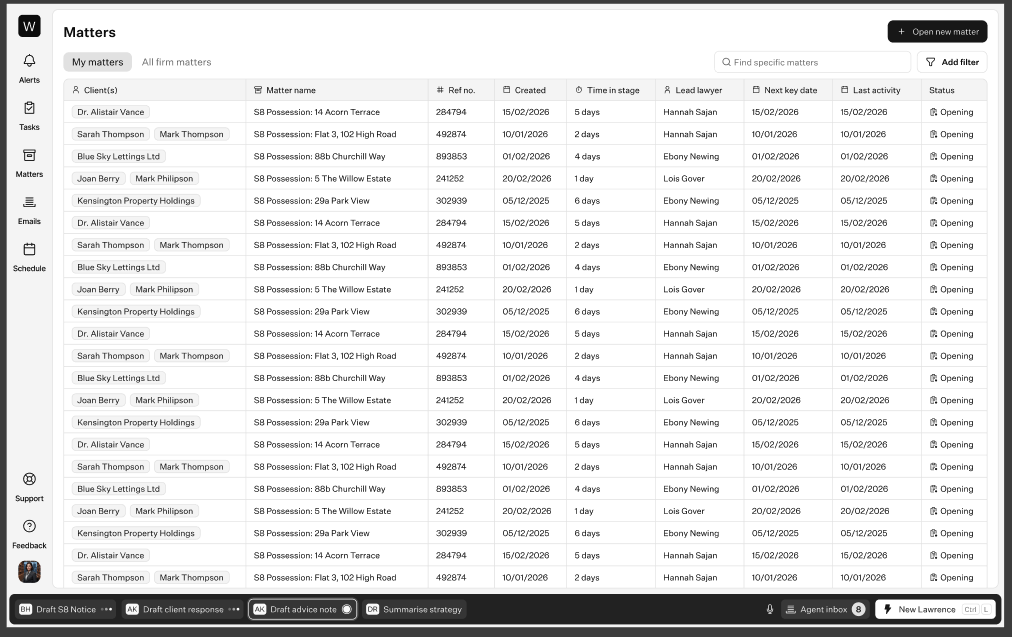
Today an agent lives inside a single matter. Global Agents lifts agents up to the whole caseload and opens the platform to more than one agent, so a firm runs a fleet of agents rather than a single in-matter assistant.
TL;DR. Lawrence stays the default legal agent inside each matter. A single global agent (intake, finance, compliance, reporting) operates across every matter a user can access, with an agent inbox and the full cross-matter queue to review its work and an agent manager to control access. Later, we split that agent into specialised sub-agents and let firms build their own. Delivered across nine milestones — six now, three later.
Outcome
Users can use agents across their whole caseload, not just inside a single matter, and (later) build their own custom agents and skills.
Today Lawrence, like any agent, only works inside a single matter. Global Agents lifts agents up to the whole caseload and opens the platform to more than one agent, so a firm runs a fleet of agents rather than a single in-matter assistant:
Lawrence stays the default legal agent that lives inside each matter.
A generalised global agent operates across every matter a user can access, covering the main jobs that sit outside the fee-earner scope (intake, finance and billing, compliance, and reporting / BI), answering questions and doing work that spans the whole caseload.
(Later) Firms get a set of specialised default agents and skills out of the box, and can amend those or build their own without code, either through a builder or by asking an AI agent to build one for them.
Users see and action what these agents produce from one place, across all their matters, rather than hunting through files. For a lawyer, that means asking one agent a question across all of their matters instead of opening each file in turn. For everyone above the fee-earner (team leads, firm owners, compliance, finance, intake), the cross-matter oversight and reporting that is their actual job stops being manual aggregation. A firm's capacity is no longer capped at one matter and one agent.
Problem statement
Lawrence is matter-scoped by design. Lawyers and firm admins can already see all of their matters in one place, but each thread, question, document and agent action is bound to a single matter, and there is currently no way to bring an agent to bear across matters. That is fine when a single file needs deep, single-matter work, but it breaks at the scale firms actually operate at.
A lawyer with 50 open cases can see them all listed, but still has to open each one to ask an agent anything. There is no way to ask "which of my matters have a court date next week" or "what comms do I need to reply to across all of my open matters" and have an agent answer across the caseload. For everyone above the fee-earner it becomes less usable, because their job is cross-matter: a team lead, firm owner, compliance officer, receptionist, cashier or intake lead can see all the matters, but to get earnings, compliance, billing or pipeline answers, someone still has to assemble the data by hand. The result is that the firm's most valuable oversight and orchestration work is capped by human bandwidth, and growth is capped by how many people a firm can put on that non-billable aggregation.
Why now
We have proven Lawrence inside a matter: agents, threads, documents all work well within a single file. Firms already have the global view of their caseload; what is missing is the AI operating at that level. The highest-leverage unlock is horizontal, taking the same agent capabilities across the whole caseload.
The data and primitives already exist. Global agents is largely about surfacing and acting on data we already have, rather than building entirely new capture. And our M&A pipeline is increasingly larger, multi-role firms: firm owners evaluate us on firm-wide oversight rather than single-matter polish. Global reporting and bulk actions are what make Lawhive credible for a whole firm rather than an individual lawyer, and give the M&A team a demonstrable "run your whole firm from here" story.
How this relates to Reporting / Firm BI
Reports are one of the main artefacts global agents will produce, especially for the personas that sit outside the fee-earner scope. Global agents are used to produce firm-wide BI reporting, intake reporting and so on. This PRD covers global agents; reporting itself is owned by BOS.
Out of scope for LEX (BOS scope): the reporting dashboard / UI, and integration into the "agents" tab.
How this relates to Automations
Users will be able to set up automation triggers for their skills and tasks, and global reports will likely be run via automations. This is a separate project we will take up next. Global agents will be able to use global skills that can be set on an automation, triggered by an event or on a schedule; an agent will be able to use a skill across multiple matters at once; and matter-level tasks will be executable by an agent, with human review.
How this relates to Skills — agent vs skill
A few months ago we built agent skills into the platform, so it's worth agreeing on the difference between an agent and a skill before we build, to avoid blurring the boundary and unnecessary repeat work.
Agent
Used for independent, multi-step orchestration and complex problem-solving. It's a persistent actor with its own system prompt, its own tool access and its own context window, so it can do large bits of work in isolation without using up the main agent's context window. It maps to a persona (e.g. intake agent, billing agent), needs its own tools and permissions, can run autonomously on demand or on a schedule, and owns its own multi-step workflows.
Skill
A modular, repeatable packaged set of instructions that loads into whatever agent is running when it's triggered. It has no identity or memory of its own; it guides workflows, answers questions, and applies identical, repeatable standards across routine tasks.
Scope
Nine milestones. The first six ship now — the platform, the shell, one generalised global agent, an agent inbox, the full cross-matter queue, and the agent manager. Three come later: specialised sub-agents, user-built custom agents, and building an agent with an agent.
The milestone sequence. M1 is in progress; M1–M6 are the near-term build, M7–M9 are later.
Requirements
Milestone 1: Agent platform + identity (backend) in progress
The shared runtime every other milestone builds on. It provides a runtime that can host multiple agent types (not just Lawrence), agents that can run outside a live single-matter session (background / async execution), and the primitives an agent needs: system prompt and tool access.
An agent can be invoked and run to completion without a user sitting inside a matter.
Multiple agent types can be registered and run on the same platform.
Every agent run is attributable and auditable: which agent ran, when, over what.
Out of scope: memory (separate state). Source of truth for exact scope lives in Linear, with Adolfo.
As a lawyer, I want to give instructions to multiple different matter agents from a single place, so that I don't have to open each matter to direct its agent.
A user can instruct any matter agent they have access to from a single surface (e.g. the matter homepage), without opening each matter individually.
Every agent interaction is bound to exactly one matter, and that matter is always identifiable from the thread.
Instructing a matter agent from the shell has the same effect and permissions as instructing it inside the matter.
As a lawyer, I want to ask a global agent questions across my matters alongside the work I'm doing within individual matters, so that I can operate at a global level without losing my in-matter context.
Matter-level agent threads and global-level threads are clearly separated and independently addressable.
It is always clear which agent the user is talking to at the global level (finance, compliance, legal).
A global thread and a matter thread can be active at the same time without their context bleeding into each other.
A global agent can only see and act across matters the user is permitted to access.
Needs design refinement. The idea is to take the agent bar we already have inside a matter and lift it to the global level, so it supports both global agent threads and cross-matter threads.
Open questions.
What happens if you pin a matter-level Lawrence while at the global level?
How many floating Lawrences can be open at once? Do our original single-thread / single-dock principles still apply?
Milestone 3: Global agent needs product refinement
Rather than build every specialised agent up front, we deliver value early by shipping one generalised global agent on top of the matter agent (Lawrence). It carries the tools to perform the main jobs that sit outside a fee-earner's scope, and lays the foundation for splitting those jobs into specialised sub-agents later (Milestone 7).
As someone working above the fee-earner scope (firm owner, compliance, finance or intake), I want a single global agent that can answer questions and do work across every matter I can access, so that I don't have to assemble it matter by matter.
A single generalised global agent is available above the matter level, distinct from the matter agent (Lawrence).
It operates across every matter the user is permitted to access, and cannot see or act on matters they can't.
It carries the tools / skills to handle intake, finance (accounting, billing, cashiering), compliance and reporting (BI) jobs.
It can produce cross-matter answers and artefacts (e.g. a report) that reference the underlying matters.
The skills are built so they can later be lifted into dedicated sub-agents without rework (Milestone 7).
Open questions.
Which of these jobs are read-only vs able to take action in the first version (if any)?
Are intake, finance, compliance and reporting the only jobs we need to consider for this? Needs refinement.
The first, lightweight version of the agent queue: one place to review everything agents have produced across matters, surfaced in the thread manager bar. The full queue (filtering and so on) comes after.
As a fee-earner, I want to see which agents have artefacts or threads waiting for my review in a single place, so that I don't have to click into each matter to find them.
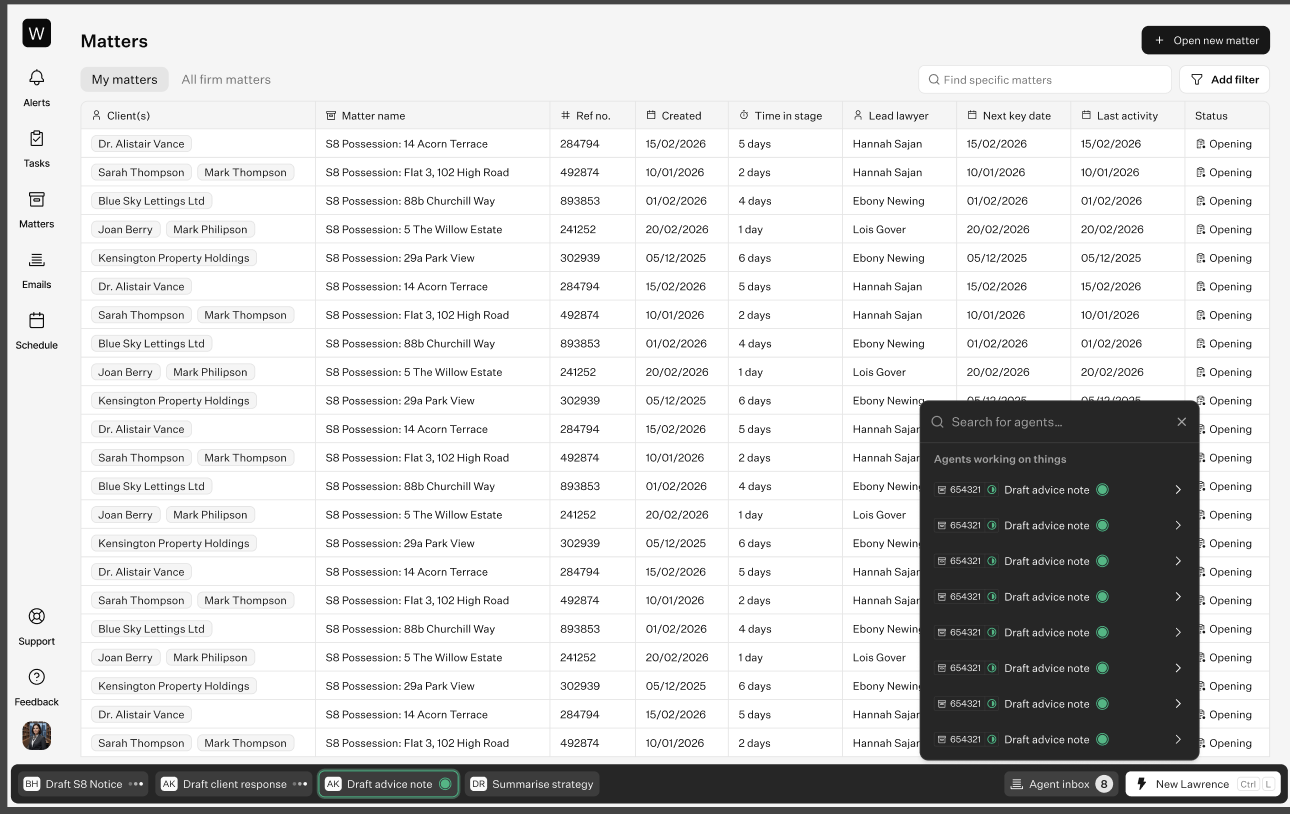
An agent inbox lives on the thread-manager bar and shows every thread that needs the user's review, action or decision.
It is always clear which matter the user is currently in or reviewing.
The user can switch between matter threads directly from the inbox, carrying enough context about each thread and matter to act on it without returning to a main screen between matters.
The inbox only surfaces work from matters the user is permitted to see.
A design, still to be refined: the agent inbox opens from the thread-manager bar as an "Agents working on things" list — every thread that needs your review, action or decision across matters, with a live status dot and a jump-in arrow, so you can switch between matters without leaving the screen.
Open question.
How are we distinguishing between the matter agents and the global agent when running both at a global level?
Milestone 5: Full agent queue not started, needs design
The full version of the agent inbox (Milestone 4): a dedicated, filterable cross-matter queue so a user can work through everything agents need from them across the whole caseload.
As a fee-earner, I want a single, filterable queue of all agent work awaiting me across every matter, so that I can work through it in priority order without hunting through matters.
All agent work awaiting the user's review is aggregated into one queue, across every matter the user has access to.
Each queue item shows which agent actioned it, what type of task it was, and which matter it belongs to.
Each item links through to the originating thread / artefact in its matter.
The queue can be filtered by agent, task type and matter.
An item leaves the queue once it has been reviewed / actioned and does not reappear.
The queue only shows work from matters the user is permitted to see.
Home 5 waiting
Everything waiting on you, across your matters.
Leaves the firm1
Reply to the client's settlement question
#4821 Hartley · 12m
Stays on the matter3
3 tasks from the court order
#4802 Voss · 1h
Key date · CCMC 22 September
#4802 Voss · 1h
Settlement agreement · 14 changes
#4790 Okafor · 2h
No draft — your call1
Limitation date in 9 days, no claim form
#4771 Adeyemi · 6h
6 checks found nothing today. See activity →
Nothing has been sent. Approving sends this from your mailbox.
Fromyour mailbox
Tothe client (Matter #4821)
SubjectRe: The settlement offer and my reference
Thank you for coming back to me so quickly.
On your question about your reference: clause 8 of the draft agreement requires Brightside to provide a reference in the agreed form annexed to it, and that obligation survives settlement.
The offer is open until 31 July, so I would like to speak before Wednesday if you are minded to accept.
Where this came from
Email triage ran when the client's email arrived, 12 minutes ago. It read 3 things before drafting.
2 emails in threadSettlement agreement v3Key date · 31 Jul
Decide
Approve & sendAsk for changesReject ⌄
The full queue as the Home surface: one triage list across every matter, grouped by what the decision does (leaves the firm / stays on the matter / no draft yet), filterable by agent, task and matter. Selecting an item shows the drafted artefact in the centre, a "where this came from" trail of what the agent read, and a decide column. Nothing is sent until the fee-earner approves; a decided item leaves the queue.
Open questions.
What counts as "awaiting review": every agent output, or only ones flagged for a decision?
Is the queue per-user, or shared across a team (e.g. a paralegal covering for someone)?
Milestone 6: Agent manager not started, needs design
Manage and control access to the agents a firm has, from one place. (Configuration of agents lives in Milestone 8.)
As a firm admin, I want to manage all of the agents my firm has in one place, so that I have a single source of truth for what's running.
All agents available to the firm are listed in one place (firm-default and any custom agents).
Each agent shows at least its name, purpose / persona, and status (active / disabled).
An admin can enable or disable an agent for the firm, an individual, or a team.
As a firm admin, I want to manage access permissions to control who can use a specific agent, so that sensitive agents are limited to the right people.
Access to each agent can be controlled per user or per role.
A user not granted access can neither invoke nor see that agent.
Permission changes take effect immediately.
Agents
Every agent your firm has — firm defaults and any you've built.
+ Add agent
NameAccessStatus
Intake & triage
Qualifies and routes new matters
Intake team
Active
Billing & time capture
Reconstructs billable time, drafts invoices
Billing / Ops
Active
Trust accounting (IOLTA)
Retainer handling, trust-vs-operating compliance
Billing / Ops
Disabled
Lives in firm admin beside Members and Teams. Each row is an agent: name and persona, an access scope (a role or "Everyone"), and a status that toggles active / disabled. Access is controlled per user or per role, so someone not granted an agent never sees or invokes it.
Open question.
What is the minimum admin role required to manage agents and control access?
Later
Milestone 7: Default sub-agents not started, needs scoping
The default set of agents and skills we ship, mapped to the matter lifecycle and roles. Still to be scoped and defined.
Milestone 8: Custom agents (user-built) not started, needs design
The custom-agent builder: the tools to amend default agents and build new agents and skills on top of the platform and the firm-default set, without code. In practice the first people to use it are forward deployed legal engineers (FDLEs), who sit with a firm to configure it and train its lawyers before the lawyers build for themselves.
As a forward deployed legal engineer (FDLE) configuring a firm, I want to map a team's workflows and build custom agents and skills for them, often sitting alongside a non-technical lawyer, so that I can set the firm up and show the lawyers how before they do it themselves.
An FDLE can create and configure agents and skills for a firm without writing code.
They can capture a team's actual workflow into an agent or skill while working alongside a lawyer.
The builder is approachable enough for a semi- or non-technical person to use and to demonstrate to a lawyer.
Everything an FDLE builds is handed over to the firm to own and maintain, and is attributable to who created it.
As a firm admin, I want to configure any agent that already exists, so that it reflects how our firm actually works.
An admin can edit a configurable agent's settings (instructions, tools it can use, its scope).
Changes take effect for subsequent runs; in-flight runs are unaffected.
Configuration changes are attributable and auditable (who changed what, when).
As a lawyer, I want to manage and customise my own legal agents, so that Lawrence and my specialist legal agents work the way I want on my matters.
A lawyer can see the legal agents available to them (Lawrence and any specialist legal agents).
A lawyer can customise the agents that operate on their own matters, within the limits the firm sets.
A lawyer's customisations apply only to their own agents and do not change firm-wide defaults or other users' agents.
Firm-level permissions and guardrails still bound what a lawyer can change.
As a non-technical firm admin, I want a simple way to build my own agent, so that I can automate a firm-specific workflow without engineering help.
A non-technical user can create an agent by giving it a name, purpose / instructions, the tools it may use, and its scope.
A user-built agent is subject to the same permissions and access controls as firm-default agents (Milestone 6).
A user-built agent can reuse existing skills rather than requiring a bespoke build.
A user-built agent is attributable to its creator and can be edited or disabled from the agent manager.
Guardrails and safe defaults prevent it acting beyond its configured scope.
New agent
Describe what it does; it reuses the skills you already have.
AccessImprove with LawrenceSave agent
Name
e.g. Client intake agent
What this agent doesA short description of the job it owns.
When it should runThe trigger — an event, a schedule, or on request.
Tools it may useWhat the agent is allowed to touch.
Matters (read)DocumentsEmailCalendar
Skills it can useReuse skills you already have.
Conflict checkFee agreement+ add skill
Scope
Matters the creator can access ▾
Access
Who can use this agent ▾
Modelled on the existing skill editor (label-left field rows, an "Improve with Lawrence" refine, Save in the top-right): name, plain-language instructions, a trigger, the tools it may use, existing skills to reuse, plus scope and access. It gets the same permission controls as firm-default agents and stays attributable to its creator and editable from the agent manager. The per-tool toggle row is net-new — today's skill editor scopes via audience access, not per-tool switches.
Open questions.
Where is the line between amending / configuring a default agent and building a new one from scratch?
Can firm-default agents be edited in place, or only cloned and then edited?
What review / approval, if any, is required before a user-built agent can run against live matters?
Milestone 9: Create an agent with an agent not started, needs tech plan
The conversational path to building agents. Rather than always filling out the builder form (Milestone 8), a sophisticated user can ask an AI agent to build another agent for them, the same way we already use AI to author a new skill. The form is the manual path; this sits on top of it.
As a sophisticated user (e.g. a forward deployed legal engineer or a power-user admin), I want to ask an AI agent to build a new agent for me, so that I don't have to fill out the builder form by hand.
A user can describe the agent they want in natural language and have an AI agent draft it (name, purpose / instructions, tools, scope).
The result is produced as a draft for the user to review, edit and confirm before it goes live, never auto-published.
The same guardrails, permissions and scope limits as the manual builder (Milestone 8) apply.
The flow mirrors the existing "create a skill with AI" experience so it feels consistent.
An agent created this way is attributable (who requested it, and that it was AI-drafted).
Open questions.
How much can the building agent do autonomously vs propose-and-confirm?
Can it also create or modify skills, or only agents?